Linguix Checker SDK API Reference
This document provides a reference for the public API of the Linguix Checker SDK.
Table of Contents
- LinguixCheckerSDK
- Custom Elements
- Interfaces
- Callback Events
- UI Components
- Transport Layer
- Service Worker Support
- Proxy Server
LinguixCheckerSDK
Methods
initialize(config: ILinguixConfig, messenger?: ILinguixMessenger): void
Initializes the SDK with the provided configuration and optional messenger.
Parameters:
config(ILinguixConfig): Configuration object with the following properties:apiKey(optional string): Your Linguix API key, can be omitted if custom proxy server is usedurl(optional string): URL of your proxy serveroptions(optional object):query(optional object): Query parameters to include in requestsclientToken(optional string): Token for authentication with your proxy server
language(optional string): Force the checker to use a specific language instead of automatic detection. By default, Linguix supports 30+ most popular languages with automatic detection. Manual language forcing is limited to: 'en-US', 'en-GB', 'en-ZA', 'en-CA', 'en-AU', 'en-NZ', 'pt-PT', 'pt-BR', 'de-DE', 'fr', 'pl-PL', 'es', 'it'callbacks(optional object): Event callbacks for SDK operationsonCheckResultReceived(optional function): Called when check results are receivedonReplacementApplied(optional function): Called when a user applies a replacement
features(optional object): Feature flagsbar(optional boolean): Enable or disable the status bar element
messenger(optional): Custom messenger implementation- Pass
ILinguixBackgroundMessengerto initialize background component - Pass
ILinguixContentMessengerto initialize content component - If not provided, initializes both components in the same context
- Pass
attachToElement(element: SupportedElement, options?: ILinguixElementConfig): void
Attaches the checker to a textarea or contenteditable element.
Parameters:
element: HTMLTextAreaElement or HTMLElement with contenteditable attributeoptions(optional): Element-specific configurationcallbacks(optional object): Element-specific event callbacksonCheckResultReceived(optional function): Called when check results are received for this elementonReplacementApplied(optional function): Called when a user applies a replacement in this element
detachFromElement(element: SupportedElement): void
Detaches the checker from an element.
Parameters:
element: The element to detach from
destroy(): void
Destroys the SDK instance and cleans up all resources.
Custom Elements
<linguix-checkable>
A wrapper element that automatically initializes the grammar checker for contained textarea or contenteditable elements.
Usage:
<linguix-checkable>
  <textarea></textarea>
</linguix-checkable>
Interfaces
ILinguixConfig
interface ILinguixConfig {
    url?: string;
    apiKey?: string;
    options?: {
        query?: {
            clientToken?: string;
        };
    };
    language?: string;
    callbacks?: ILinguixCallbacks;
    features?: {
        bar?: boolean;
    };
}
ILinguixCallbacks
interface ILinguixCallbacks {
    onCheckResultReceived?: (result: {
        textStats?: ILinguixTextStats,
        alertsCount: number
    }) => void;
    onReplacementApplied?: (data: {
        originalText: string,
        replacement: string,
        description: string
    }) => void;
}
ILinguixElementConfig
interface ILinguixElementConfig {
    callbacks?: ILinguixCallbacks;
}
ILinguixTextStats
interface ILinguixTextStats {
    wordsCount: number;        // Total number of words in the text
    charsCount: number;        // Total number of characters in the text
    avgWordLength: number;     // Average word length
    avgSentenceLength: number; // Average sentence length (in words)
    sentencesCount: number;    // Total number of sentences
    fleschIndex: number;       // Flesch Reading Ease score (0-100, higher is easier to read)
    textScore: number;         // Overall text quality score
    readingTimeSeconds: number; // Estimated reading time in seconds
    speakingTimeSeconds: number; // Estimated speaking time in seconds
}
ILinguixMessage
interface ILinguixMessage {
    type: string;    // Message type
    id: string;      // Unique input field identifier
    payload?: any;   // Optional message data
}
ILinguixContentMessenger
Interface for implementing content-side messaging.
interface ILinguixContentMessenger {
    sendToBackground(message: ILinguixMessage): void;
    onBackgroundMessage(callback: (message: ILinguixMessage) => void): void;
    destroy(): void;
}
ILinguixBackgroundMessenger
Interface for implementing background-side messaging.
interface ILinguixBackgroundMessenger {
    sendToContent(message: ILinguixMessage): void;
    onContentMessage(callback: (message: ILinguixMessage) => void): void;
    destroy(): void;
}
Callback Events
onCheckResultReceived
Triggered when check results are received from the Linguix API.
Callback data:
textStats: Statistics about the checked text (readability scores, word count, etc.)alertsCount: The number of alerts (grammar/spelling issues) found in the text
onReplacementApplied
Triggered when a user applies a replacement suggestion from the popover.
Callback data:
originalText: The original text that was replacedreplacement: The replacement text that was applieddescription: The description of the error as shown in the alert popover
UI Components
The SDK provides several UI components that are automatically attached to the input fields:
Status Bar
A status indicator that appears in the bottom-right corner of the input field, showing the current state of the grammar checking process.
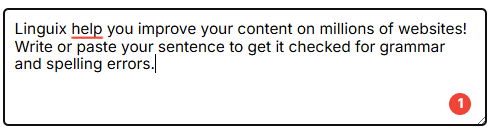
The status bar displays:
- A loading spinner when text is being checked (purple when initial, red for errors, green for no errors)
- A count of grammar/spelling issues found (red badge with number)
- A checkmark when no issues are found (green badge with checkmark)
Styling Options: The status bar appearance can be fully customized using CSS variables. See the Status Bar Styling section in the styling guide for complete customization options.
Configuration:
You can disable the status bar entirely:
LinguixCheckerSDK.initialize({
  apiKey: 'your-api-key',
  features: {
    bar: false // Disables the status bar
  }
});
See Also
For more detailed information on using callbacks, see the Callbacks Documentation.
Transport Layer
The SDK uses WebSockets for communication with Linguix grammar checking services. If you need HTTP transport instead, please contact us at [email protected].
Service Worker Support
For background scripts running in service worker environments (like browser extensions' background scripts) where browser DOM APIs are not available, the SDK provides a specialized worker import:
import { LinguixCheckerSDK } from '@linguix.com/lx-checker-sdk/worker';
This is a drop-in replacement for the standard import that provides the same API but is optimized for environments without browser DOM APIs. When using this import:
- The messenger parameter is required when initializing the SDK
- The messenger must implement the
ILinguixBackgroundMessengerinterface - Only background component functionality is available (no UI components)
Example usage:
import { LinguixCheckerSDK } from '@linguix.com/lx-checker-sdk/worker';

// A messenger implementation is required in worker environments
const messenger = new YourBackgroundMessenger();

// Initialize with API key
LinguixCheckerSDK.initialize({apiKey: 'your-api-key'}, messenger);

// Or with custom configuration
LinguixCheckerSDK.initialize({
  url: 'http://your-proxy-server.com:3000',
  options: {
    query: {
      clientToken: 'some-token'
    }
  }
}, messenger);
Proxy Server
For production applications, you may want to use a proxy server to keep your API key secure. See the Proxy Server Guide for implementation details.
When using a proxy server, initialize the SDK with the initialize method:
LinguixCheckerSDK.initialize({
  url: 'http://localhost:3000',
  options: {
    query: {
      clientToken: 'some-token'
    }
  }
});